
kd> lm
start    end        module name
00b70000 00c07000   windbg     (deferred)
68cf0000 6908b000   dbgeng     (deferred)
69090000 690d8000   symsrv     (deferred)
690e0000 69221000   dbghelp    (deferred)
6f9c0000 6fa54000   MSFTEDIT   (deferred)
[snip]

Unloaded modules:
94352000 943bc000   spsys.sys
942df000 94349000   spsys.sys
88bf1000 88bfe000   crashdmp.sys
88800000 8880a000   dump_storport.sys
82e00000 82e18000   dump_LSI_SAS.sys
8d41d000 8d42e000   dump_dumpfve.sys
69090000 690d8000   symsrv.dll
Before building this functionality into Volatility, we have to understand where the data is kept and what functions in the kernel are responsible for tracking it.
Kernel modules are typically represented as _LDR_DATA_TABLE_ENTRY structures. The list head is located in the _KDDEBUGGER_DATA64 block named PsLoadedModuleList – this is how the modules plugin enumerates modules. An example of the data structure is shown below (for an x86 system).
>>> dt("_LDR_DATA_TABLE_ENTRY")
'_LDR_DATA_TABLE_ENTRY' (80 bytes)
0x0   : InLoadOrderLinks               ['_LIST_ENTRY']
0x8   : InMemoryOrderLinks             ['_LIST_ENTRY']
0x10  : InInitializationOrderLinks     ['_LIST_ENTRY']
0x18  : DllBase                        ['pointer', ['void']]
0x1c  : EntryPoint                     ['pointer', ['void']]
0x20  : SizeOfImage                    ['unsigned long']
0x24  : FullDllName                    ['_UNICODE_STRING']
0x2c  : BaseDllName                    ['_UNICODE_STRING']
0x34  : Flags                          ['unsigned long']
0x38  : LoadCount                      ['unsigned short']
0x3a  : TlsIndex                       ['unsigned short']
0x3c  : HashLinks                      ['_LIST_ENTRY']
0x3c  : SectionPointer                 ['pointer', ['void']]
0x40  : CheckSum                       ['unsigned long']
0x44  : LoadedImports                  ['pointer', ['void']]
0x44  : TimeDateStamp                  ['UnixTimeStamp', {'is_utc': True}]
0x48  : EntryPointActivationContext    ['pointer', ['void']]
0x4c  : PatchInformation               ['pointer', ['void']]
>>> dt("_UNLOADED_DRIVER")
'_UNLOADED_DRIVER' (24 bytes)
0x0   : Name                           ['_UNICODE_STRING']
0x8   : StartAddress                   ['address']
0xc   : EndAddress                     ['address']
0x10  : CurrentTime                    ['WinTimeStamp', {}]
void MiRememberUnloadedDriver(_UNICODE_STRING *SourceDriverName, int StartAddress, int a3)
{
  _UNLOADED_DRIVER *pArray[50];
  int dwLastDriver;
  _UNLOADED_DRIVER *UnloadedDriver;
  LSA_UNICODE_STRING *CopyDriverName;

  if ( SourceDriverName->Length )
  {
    ExAcquireResourceExclusiveLite(&PsLoadedModuleResource, 1);
    if ( MmUnloadedDrivers )
    {
      dwLastDriver = MmLastUnloadedDriver;
      if ( MmLastUnloadedDriver < 50 )
        goto extend_list;
    }
    else
    {
      pArray = ExAllocatePoolWithTag(0, 50 * sizeof(_UNLOADED_DRIVER), 'TDmM');
      MmUnloadedDrivers = pArray;
      if ( !pArray )
      {
finished:
        ExReleaseResourceLite(&PsLoadedModuleResource);
        return;
      }
      memset(pArray, 0, 50 * sizeof(_UNLOADED_DRIVER));
    }
    dwLastDriver = 0;
    MmLastUnloadedDriver = 0;
extend_list:
    UnloadedDriver = &MmUnloadedDrivers[dwLastDriver];
    RtlFreeAnsiString(UnloadedDriver);
    CopyDriverName = ExAllocatePoolWithTag(NonPagedPool, SourceDriverName->Length, 'TDmM');
    UnloadedDriver->Name.Buffer = CopyDriverName;
    if ( CopyDriverName )
    {
      memcpy(CopyDriverName, SourceDriverName->Buffer, SourceDriverName->Length);
      UnloadedDriver->Name.Length = SourceDriverName->Length;
      UnloadedDriver->Name.MaximumLength = SourceDriverName->MaximumLength;
      *&UnloadedDriver->StartAddress = StartAddress;
      KeQuerySystemTime(&UnloadedDriver->CurrentTime);
      ++MiTotalUnloads;
      ++MmLastUnloadedDriver;
    }
    else
    {
      ++MiUnloadsSkipped;
      UnloadedDriver->Name.MaximumLength = 0;
      UnloadedDriver->Name.Length = 0;
    }
    goto finished;
  }
}
You can take away a few importact facts from browsing the source code:
- The system remembers a maximum of 50 drivers
- Once the max is reached, everything is erased, and it starts over with 50 blank slots
- The pool tag associated with unloaded drivers is MmDT
Its also important to note that MmUnloadSystemImage() is called from numerous other functions in the kernel, as shown by the list of cross-references below.
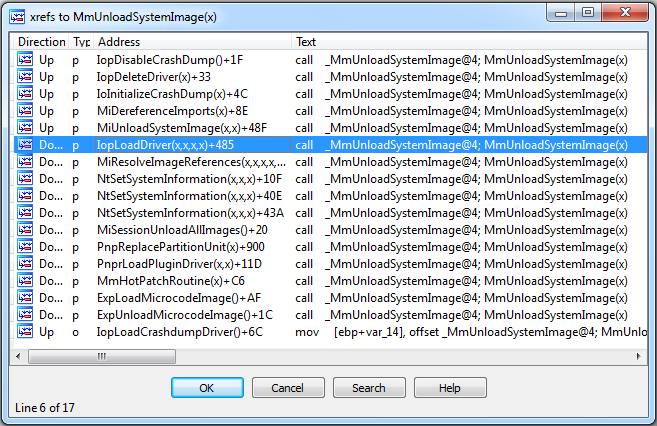
I didn’t do exhaustive code analysis to see if there’s a way to unload a driver without it being remembered, but at first glance it looks like most of the well known paths are accounted for.
Analyzing a Memory Dump
While scanning through some old malware-infected memory dumps, I noticed a strange artifact left by a Rustock variant. A module named xxx.sys apparently occupied the range 0x00f6f88000 – 0xf6fc2000 of kernel memory just before it unloaded at 2010-12-31 18:47:57.
$ python vol.py -f rustock-c.vmem unloadedmodules
Volatile Systems Volatility Framework 2.3_beta
Name                 StartAddress EndAddress Time
-------------------- ------------ ---------- ----
Sfloppy.SYS          0x00f8b92000 0xf8b95000 2010-12-31 18:46:04
Cdaudio.SYS          0x00f89d2000 0xf89d7000 2010-12-31 18:46:04
splitter.sys         0x00f8c1c000 0xf8c1e000 2010-12-31 18:46:40
swmidi.sys           0x00f871a000 0xf8728000 2010-12-31 18:46:41
aec.sys              0x00f75d8000 0xf75fb000 2010-12-31 18:46:41
DMusic.sys           0x00f78d0000 0xf78dd000 2010-12-31 18:46:41
drmkaud.sys          0x00f8d9c000 0xf8d9d000 2010-12-31 18:46:41
kmixer.sys           0x00f75ae000 0xf75d8000 2010-12-31 18:46:46
xxx.sys              0x00f6f88000 0xf6fc2000 2010-12-31 18:47:57
$ python vol.py -f rustock-c.vmem modules | grep -i xxx
Volatile Systems Volatility Framework 2.3_beta
$ python vol.py -f rustock-c.vmem modscan | grep -i xxx
Volatile Systems Volatility Framework 2.3_beta
My first step was to see if a file named xxx.sys in fact existed on the victim machine’s disk. For that I used @gleeda’s mftparser (which she’ll explain in more detail in a future MoVP post).
$ python vol.py -f rustock-c.vmem mftparser
[snip]
MFT entry found at offset 0xc6d49f8
Attribute: In Use & File
Record Number: 20507
Link count: 1

$STANDARD_INFORMATION
Creation                       Modified                       MFT Altered                    Access Date                    Type
------------------------------ ------------------------------ ------------------------------ ------------------------------ ----
2010-12-31 18:46:44 UTC+0000 2010-12-31 18:46:44 UTC+0000   2010-12-31 18:46:44 UTC+0000   2010-12-31 18:46:44 UTC+0000   Archive

$FILE_NAME
Creation                       Modified                       MFT Altered                    Access Date                    Name/Path
------------------------------ ------------------------------ ------------------------------ ------------------------------ ---------
2010-12-31 18:46:44 UTC+0000 2010-12-31 18:46:44 UTC+0000   2010-12-31 18:46:44 UTC+0000   2010-12-31 18:46:44 UTC+0000   WINDOWSsystem32xxx.sys
[snip]
The next direction I went in was to scan memory for references to xxx.sys. This may help identify the initial dropper component and/or explain how the driver got loaded in the first place. I used yarascan for this purpose.
$ python vol.py -f rustock-c.vmem yarascan -Y "xxx.sys" --wide
Volatile Systems Volatility Framework 2.3_beta
Rule: r1
Owner: Process csrss.exe Pid 600
0x004e95b0  78 00 78 00 78 00 2e 00 73 00 79 00 73 00 31 00   x.x.x...s.y.s.1.
0x004e95c0  20 00 44 00 61 00 74 00 65 00 69 00 28 00 65 00   ..D.a.t.e.i.(.e.
0x004e95d0  6e 00 29 00 20 00 6b 00 6f 00 70 00 69 00 65 00   n.)...k.o.p.i.e.
0x004e95e0  72 00 74 00 2e 00 43 00 3a 00 5c 00 6d 00 61 00   r.t...C.:..m.a.
Rule: r1
Owner: Process csrss.exe Pid 600
0x004e99bc  78 00 78 00 78 00 2e 00 73 00 79 00 73 00 44 00   x.x.x...s.y.s.D.
0x004e99cc  72 00 69 00 76 00 65 00 72 00 20 00 49 00 6e 00   r.i.v.e.r...I.n.
0x004e99dc  73 00 74 00 61 00 6c 00 6c 00 65 00 72 00 20 00   s.t.a.l.l.e.r...
0x004e99ec  31 00 2e 00 30 00 20 00 42 00 79 00 20 00 57 00   1...0...B.y...W.
Rule: r1
Owner: Process csrss.exe Pid 600
0x0085777c  78 00 78 00 78 00 2e 00 73 00 79 00 73 00 00 00   x.x.x...s.y.s...
0x0085778c  78 00 2e 00 73 00 79 00 73 00 00 00 c3 01 61 06   x...s.y.s.....a.
0x0085779c  00 00 0b 00 b0 c1 64 bc 78 af 64 bc 74 61 74 75   ......d.x.d.tatu
0x008577ac  73 62 61 72 33 32 00 00 00 00 00 00 00 00 00 00   sbar32..........
Rule: r1
Owner: Process csrss.exe Pid 600
0x010233b0  78 00 78 00 78 00 2e 00 73 00 79 00 73 00 00 00   x.x.x...s.y.s...
0x010233c0  02 00 10 00 74 01 08 01 38 33 02 01 64 00 5c 00   ....t...83..d..
0x010233d0  04 00 02 00 76 01 08 01 18 33 02 01 6e 00 73 00   ....v....3..n.s.
0x010233e0 74 00 64 00 72 00 69 00 76 00 65 00 72 00 20 00 t.d.r.i.v.e.r...$ python vol.py -f rustock-c.vmem cmdscan Volatile Systems Volatility Framework 2.3_beta ************************************************** CommandProcess: csrss.exe Pid: 600 CommandHistory: 0x4e4d68 Application: ?Nd.exe Flags: CommandCount: 13 LastAdded: 12 LastDisplayed: 12 FirstCommand: 0 CommandCountMax: 50 ProcessHandle: 0x0 Cmd #1 @ 0x1023318: ?d files Cmd #2 @ 0x1023338: Nir?? Cmd #3 @ 0x4e1eb8: ??Nkit t Cmd #5 @ 0x10233c8: ?d????nstdriver r??N?N start xxx Cmd #6 @ 0x10233d8: ?nstdriver r??N?N start xxx Cmd #7 @ 0x10235b0: ?d WINDOWS Cmd #8 @ 0x10235d0: N?Nsystem32 ????nstdriver -Install xxx xxx.sys ?? Cmd #9 @ 0x10235f0: ?nstdriver -Install xxx xxx.sys ?? Cmd #10 @ 0x4ecef8: Negedit? Cmd #11 @ 0x10233f8: N?N start xxx Cmd #12 @ 0x1023ba0: ?d]
As you can see, the “xxx.sys” strings we found in csrss.exe really belonged to someone’s cmd.exe session. The attacker installed the driver via command-line using a utility called instdriver.exe. You may notice some unprintable characters in the output – that’s because the cmd.exe session is no longer valid. In fact, cmd.exe is not even running anymore according to the process list. Thus the data we’re analyzing is truly volatile – its no longer in use by the OS…just lingering around until its re-used or overwritten with other data.
Conclusion