
Month of Volatility Plugins
The MoVP 1.3 plugin, named deskscan, enumerates desktops, desktop heap allocations, and associated threads. In the GUI landscape, a desktop is essentially a container for application windows and user
interface objects. Malware utilizes desktops in various ways, from launching applications in alternate desktops (i.e. so the current logged-on user doesn’t see) to ransomware that locks users out of their own desktop. We’ll see some examples of both in this post. Before we begin, here is brief summary of the ways you might use the deskscan plugin in your investigations:
- Find rogue desktops used to hide applications from logged-on users
- Detect desktops created by ransomware
- Link threads to their desktops
- Analyze the desktop heap for memory corruptions
- Profile dekstop heap allocations to locate USER objects
Key Points
- dwSessionId can be used to link a desktop to its owning session (it will match _MM_SESSION_SPACE.SessionId).
- pDeskInfo points to a tagDESKTOPINFO – this is where information on the desktop’s global hooks is stored. The tagDESKTOPINFO.spwnd field also identifies the active foreground window.
- rpdeskNext can be used to enumerate all desktops in the same window station.
- rpwinstaParent identifies the window station to which the desktop belongs.
- pheapDesktop points to the desktop heap – it can be parsed in the same way as a process heap.
- PtiList is a list of tagTHREADINFO structures, one for each thread attached to the desktop.
tagWINDOWSTATION.rpdeskList. It is also possible to
simply scan for desktop objects (pool tag Desk).
The
output below shows WinSta0Default, WinSta0Disconnect, and WinSta0Winlogon in session 2.
$ python vol.py -f rdp.mem –profile=Win2003SP2x86 deskscan
Volatile Systems Volatility Framework 2.1_alpha
**************************************************
Desktop: 0x8001038, Name: WinSta0Default, Next: 0x8737bc10
SessionId: 2, DesktopInfo: 0xbc6f0650, fsHooks: 2128
spwnd: 0xbc6f06e8, Windows: 238
Heap: 0xbc6f0000, Size: 0x300000, Base: 0xbc6f0000, Limit: 0xbc9f0000
7808 (notepad.exe 6236 parent 5544)
7760 (csrss.exe 7888 parent 432)
5116 (csrss.exe 7888 parent 432)
8168 (PccNTMon.exe 5812 parent 5132)
3040 (cmd.exe 5544 parent 5132)
6600 (csrss.exe 7888 parent 432)
7392 (explorer.exe 5132 parent 8120)
5472 (explorer.exe 5132 parent 8120)
548 (PccNTMon.exe 5812 parent 5132)
6804 (mbamgui.exe 5220 parent 5132)
2008 (ctfmon.exe 4576 parent 5132)
3680 (PccNTMon.exe 5812 parent 5132)
2988 (VMwareTray.exe 3552 parent 5132)
1120 (explorer.exe 5132 parent 8120)
4500 (explorer.exe 5132 parent 8120)
7732 (explorer.exe 5132 parent 8120)
6836 (explorer.exe 5132 parent 8120)
7680 (winlogon.exe 3272 parent 432)
7128 (rdpclip.exe 6772 parent 3272)
5308 (rdpclip.exe 6772 parent 3272)
**************************************************
Desktop: 0x737bc10, Name: WinSta0Disconnect, Next: 0x8a2f2068
SessionId: 2, DesktopInfo: 0xbc6e0650, fsHooks: 0
spwnd: 0xbc6e06e8, Windows: 25
Heap: 0xbc6e0000, Size: 0x10000, Base: 0xbc6e0000, Limit: 0xbc6f0000
**************************************************
Desktop: 0xa2f2068, Name: WinSta0Winlogon, Next: 0x0
SessionId: 2, DesktopInfo: 0xbc6c0650, fsHooks: 0
spwnd: 0xbc6c06e8, Windows: 6
Heap: 0xbc6c0000, Size: 0x20000, Base: 0xbc6c0000, Limit: 0xbc6e0000
6912 (winlogon.exe 3272 parent 432)
1188 (winlogon.exe 3272 parent 432)
8172 (winlogon.exe 3272 parent 432)
**************************************************
[snip]
- Default is the default desktop for applications in the interactive window station. It is what you see 99.9% of the time you’re logged into a Windows system. Thus it makes sense that explorer.exe runs in this desktop (also note there are 6 different Explorer threads all running in this same desktop).
- The number of windows in the Default desktop is also much higher than the others (238 compared to 25 in Disconnect and 6 in Winlogon). In order to allow the creation of so many more windows (and other objects), it makes sense that the Default desktop’s heap size is also much higher (0x300000 compared to 0x10000 and 0x20000).
- The only threads in the Winlogon desktop actually belong to winlogon.exe.
- The only desktop with global hooks is Default (fsHooks: 2128). This value can be parsed to report on installed windows message hooks.
details on the desktop’s heap allocations. As described in Windows Hook ofDeath: Kernel Attacks through Usermode Callbacks by Tarjei Mandt, the win32k!ghati
symbol is an array of structures, one for each USER object type, telling you if
the objects are allocated from the desktop heap, shared heap, or session pool.
Windows (tagWND) and hooks (tagHOOK)
are two examples of objects you can find on the desktop heap. Thus, if you know
the size of a tagWND (0x128 on Windows 7 x64) and
the size of a heap header for that platform, you can walk the desktop heap
allocations and narrow down the possible addresses of window structures.
mode:
As you can see, the base of the desktop heap can be found at 0xfffff900c0600000. Desktop heaps use the same structures as the Win32/NT API (i.e. _HEAP and _HEAP_ENTRY), so parsing them is very similar to the way you enumerate process heap allocations. In the following example, we show how its possible to locate potential tagWND structures using this method.
Of course, its possible to see false positives with this
method, since all we’re matching on is the size of an allocation, especially if
two or more objects were the same size. In fact, this is just a
proof-of-concept explaining how the desktop heap can be leveraged if it became
necessary. For example, later we’ll describe how the userhandles plugin can
locate all USER objects, including tagWND, regardless
of whether they’re allocated from the desktop heap, shared heap, or session
pool. However, if the USER handle table is not accessible for some reason, at
least we could use the heap allocations as a backup.
network. If the attacker wants to run applications on the victim machine, the
malware creates a hidden desktop to run them in. You may notice that if you try
to CreateProcess(“ipconfig.exe”, …) even if the SW_HIDE
flag is set, a console window may flash instantaneously and alert the user that
something suspicious is running in the background. Additionally, if an attacker
opens a non-visible Internet Explorer instance (for example with COM APIs) in
the logged on user’s Default desktop, the application’s threads (and thus its
window messages) are subject to hooking and monitoring by any other tools in
the desktop.
Tigger injects into explorer.exe. It uses all the same flags, APIs, and
variables that the real malware used. Here’s how it works:
- Create a new desktop named system_temp_ if it doesn’t already exist
- Generate a temporary file name that will be used to capture the redirected output of console commands
- Set STARTUPINFO.lpDesktop to WinSta0system_temp_
- Set dwFlags to indicate the STARTUPINFO structure also has preferences for window visibility and standard output and standard error handles for the process to be created
- Create the new process (full path to the process szCmd is passed into the function as an argument – originally from an attacker over the network)
- Wait for the process to complete
- Read the process’s output (if any) from the specified output file and return it in a buffer
and GUI applications without the user noticing and without being detected by
security products that only monitor windows and window messages broadcasted in
the user’s Default desktop. Of course, some of the more robust antivirus suites
now monitor all desktops, but many of them still do not.
threads have references to it). That’s why Volatility leverages object scanning
through physical memory to try and detect traces of past activity.
ACCDFISA Ransomware
Internet Security Agency), described on the Emsisoft blog is a ransomware
that creates a new desktop to display the ransom notice; and effectively locks
users out of the system until they enter a special code. For example, one of
the variants will display the message shown below after an infected
system is booted:

are forced to comply with the attacker’s demands, or figure out some other way
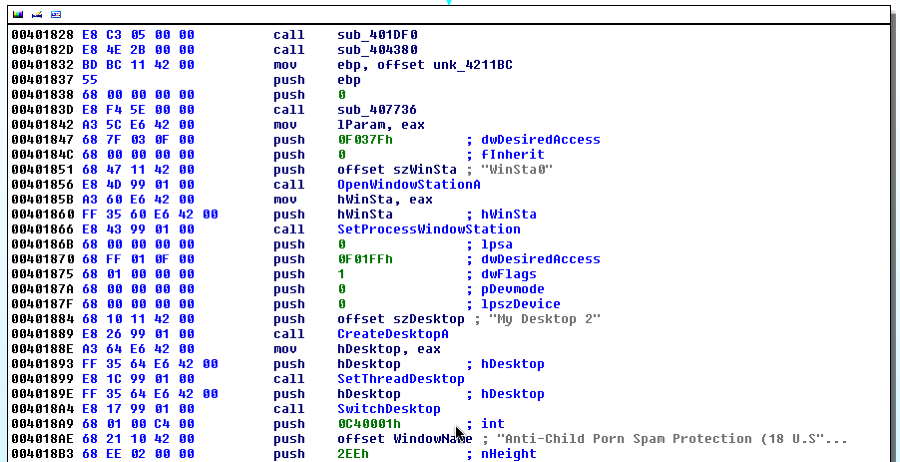
around it. As shown in the next screenshot, to create this screen-lock effect, the
malware uses CreateDesktopA to create a new desktop
named My Desktop 2 and then switches to it with SwitchDesktop.
not be surprising – a suspiciously named desktop with a single process (besides
the typical csrss.exe) associated with the desktop. In the output below, notice
the desktop is WinSta0My Desktop 2 and the only thread attached to the desktop
besides those from csrss.exe is thread ID 308 from svchost.exe. As you can
imagine, a single thread running alone in a desktop is not typical.
bit more evidence to explicitly link it with the ransomware message.
ACCFISA.vmem wintree
**************************************************
Porn Spam Protection (18 U.S.C. ? 2252) (visible) svchost.exe:300
WindowClass_0
Code (visible) svchost.exe:300 Button
Id #: 1074470467 Our special service email: security11220@gmail.com
(visible) svchost.exe:300 Static
ID Number and our contacts (please write down this data): (visible)
svchost.exe:300 Static
are owned by svchost.exe with process ID 300. Now you can start your initial
investigation based on this specific process. For example, using dlllist shows
it’s not a real svchost.exe, rather its hosted out of the C:wnhsmlud
directory:
ACCFISA.vmem dlllist -p 300
C:wnhsmludsvchost.exe
C:WINDOWSsystem32ntdll.dll
C:WINDOWSsystem32kernel32.dll
C:WINDOWSsystem32MSVCRT.dll
for it in the registry. In the following output, it is easily locatable in the
registry hives cached in kernel memory:
ACCFISA.vmem printkey -K “MicrosoftWindowsCurrentVersionRun”
= Volatile
DeviceHarddiskVolume1WINDOWSsystem32configsoftware
Tools : (S) “C:Program
FilesVMwareVMware ToolsVMwareTray.exe”
Process : (S) “C:Program FilesVMwareVMware ToolsVMwareUser.exe”
SunJavaUpdateSched : (S) “C:Program FilesCommon FilesJavaJava
Updatejusched.exe”
More information on the deskscan plugin and its usages in forensic investigations will be presented at Open Memory Forensics Workshop (OMFW) 2012.