
Month of Volatility Plugins
So far in the Windows GUI memory space, an area previously unexplored by forensic and malware analysis tools, you have seen sessions, window stations, desktops and atoms. Today’s MoVP 2.2 post is about windows. Windows are containers for buttons,
scroll bars, text/edit areas, and so on. They have titles, coordinates, and
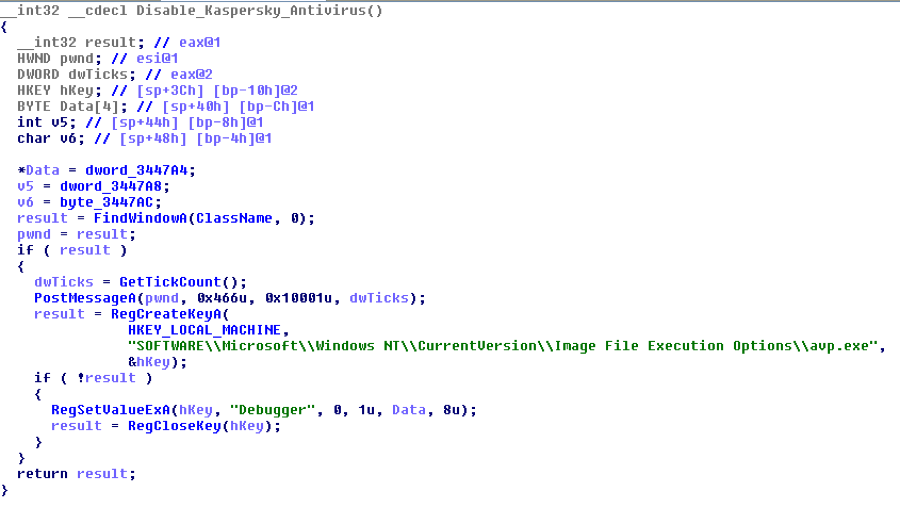
visibility properties (like minimized, maximized, transparent or overlapped). They play such a massive role in UI, its no surprise that malware and attackers have found numerous ways to abuse windows and the window messaging architecture. For example, its common to see windows being used for inter-process communication, environmental awareness (i.e. detecting security/monitoring tools), disabling antivirus, defeating debuggers, simulating user interactions (like mouse clicks and keystrokes), and monitoring USB insertions.
object is tagWND. Due to its large size,
only a few select members are shown.
- ExStyle is a combination of extended style flags (the dwExStyle parameter to CreateWindowEx). For example, WS_EX_ACCEPTFILES if the window accepts drag-drop files or WS_EX_TRANSPARENT to achieve transparency.
- style is a combination of style flags such as WS_VISIBLE. This tells you if the window was initially visible.
- The various spwnd fields such as spwndParent and spwndChild can be used to reconstruct the Z-order relationship of windows on a desktop.
- rcWindow and rcClient are tagRECT structures which have a left, right, bottom and top value. Together, the values indicate the position of the window within the desktop.
- lpfnWndProc is the window procedure function. Typically, all windows of a given class have the same window procedure, but that can be changed with window sub-classing (for example to customize the behavior of a button or form).
- pcls is a pointer to the tagCLS which identifies the window’s class.
- strName is the window’s name/title (the lpWindowName argument to CreateWindowEx).
all desktops – even desktops in non-interactive window stations. It starts at tagDESKTOP.pDeskInfo.spwnd (a tagWND
for the foreground window) and walks the Z-order. There are a number of
interesting things you can see with this plugin. For example, with a basic
process listing, you could see iexplore.exe and determine a browser was open,
but with the windows plugin, you could drill down to any windows of the IEFrame class and see the title of the page being
viewed:
commands typed into cmd.exe prompts, because the title of the window changes. This is by no means equivalent to pulling command histories like cmdscan and consoles, but you never know when you’ll get lucky – just search for ConsoleWindowClass during your investigations.
livekd -w
malware involved bundling an executable inside compressed windows help files
(.chm). The standard chm viewer is hh.exe that you may see in a process list,
but as shown below, you can also extract the name of the page being viewed. In
this case, it’s just the help for Windbg, but if it was something like
“Congrats you won 10 million dollars” then it might give you an idea of how a
machine initially became infected (a gullible user / social engineering
victim).
Windows
windows of the class TrayClockWClass
will typically display the current local time of the computer. Likewise, windows of the class Desktop User Picture will reveal the current logged
on user’s name.
than the windows plugin. It exists to show you the parent/child relationship
between windows in the desktop. Here is a preview of the hh.exe window tree –
you can see that all windows are visible, starting with the HH Parent, then HH
Child, and including various Buttons, ComboBoxes, Edits, Toolbars, and an
embedded Shell DocObject View with Internet Explorer_Server (this is why .chm
files used to be so dangerous – their content is rendered with IE).
win7x64.dd –profile=Win7SP1x64 wintree
hh.exe:1952 Static
Malware Abusing Windows
Most of the situations we’ll describe in the rest of this post can fit into one of two categories:
- Malware that leverages existing windows on the system, for example to detect a running security application, insert keystrokes or mouse movements into a browser’s message queue, or carry out some attack against the window operations (think Shatter Attack)
- Malware that creates its own windows for inter-process communication, monitoring USB insertions, etc.
Window name detection (anti-RCE). Many malware families scan for window names created by antivirus, monitoring, and other security applications for use as an anti-RCE tactic. For example, they may call FindWindow or EnumWindows looking for “Process Monitor – Sysinternals: http://www.sysinternals.com” and then use GetWindowThreadProcessId to obtain the PID of procexp.exe from the window handle…then attempt to TerminateProcess. Or they may query for windows related to Wireshark and simply refuse to execute if any exist. Be aware of this if you’re running samples on a VM or sandbox with familiar tools running at the same time. Also note that the malware thread must be running in the same desktop as the window its trying to detect. If you see malware enumerating desktops (EnumDesktops) and using SetThreadDesktop or SwitchDesktop, its trying to find windows system-wide and not just in the active desktop.
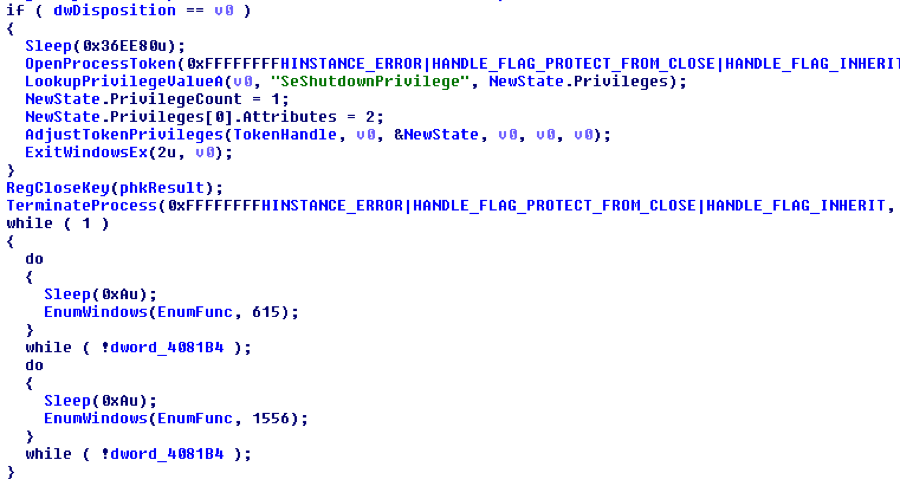
Dismissing alerts/prompts before users see. After disabling Windows File
Protection and overwriting kernel32.dll, wininet.dll, and other system DLLs,
Bankpatch calls ExitWindowsEx to reboot the
machine. This is so the malicious DLLs are loaded into all target processes as
soon as possible. Then the malware uses the window messaging architecture to
dismiss any prompts that the operating system generates due to the reboot
request (such as “You have unsaved work, do you really want to reboot?”). As
shown below, the malware does this by calling EnumWindows
in a loop, until the system shuts down – passing control to the EnumFunc callback.
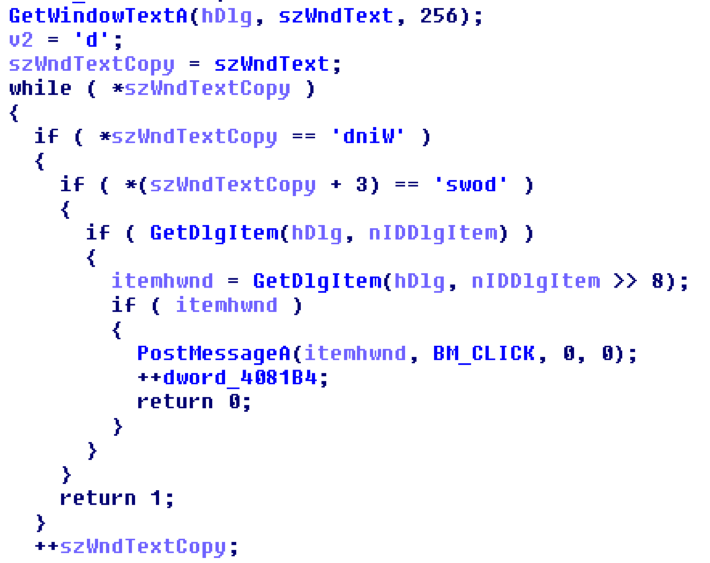
to scan for text displayed inside the prompt window. If it begins with the
string “Windows” then it uses GetDlgItem,
likely to select the “OK” button and then posts a BM_CLICK
message to the window thread’s message queue. This simulates a user clicking
“OK” – the system has no idea it all happened automatically. In the end,
Bankpatch was able to reboot the system without any user interaction required.
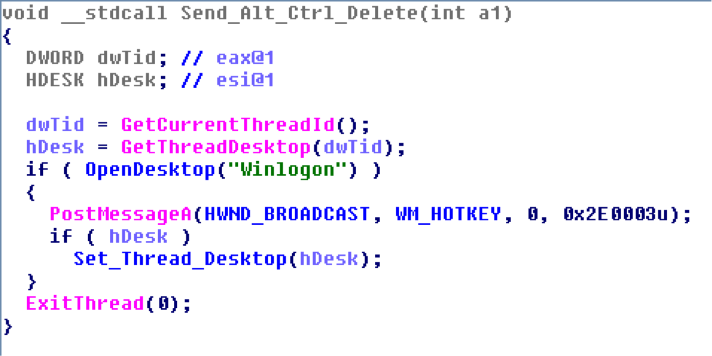
observe/record user actions, but it may want to perform actions on its own. For
example, to log in, open a browser, and visit a specific web page (Koobface did this, but using IE’s COM interface rather than synthesizing UI interactions). Blazgel is an example of malware with the ability to open the
Winlogon desktop and simulate a user pressing CTRL+ALT+DEL to access a login
prompt (in case the screen saver with automatic lock turned on). To do this, you can broadcast a WM_HOTKEY message with number 0x2E0003 (MOD_ALT | MOD_CTRL | MOD_DEL) as shown below:
channel. One packet sends a string “EVENTMOUSE” if the attackers want to
simulate a mouse movement. The next packet, read by Recv_Data,
specifies the X and Y coordinates, which are then applied with SetCursorPos and triggered by mouse_event.

for use as the window class name, then created a window with CreateWindowExA and configured it to monitor for WM_DEVICECHANGE notifications. In this manner, the
malware was able to detect immediately when new USB devices were inserted, and
it could proceed with infection. The disassembly below shows the code from Conficker’s binary that sets up the new window:

named AFX64c313 (this is hard-coded unlike Conficker’s) and creates a window of that class with the exact same name. As
described in Stuxnet’s Footprint In Memory with Volatility 2.0, here is
the view of this artifact from atomscan – the plugin discussed in yesterday’s MoVP 2.1 post.
Refs Pinned Name
0 MSWHEEL_ROLLMSG
0 C:WINDOWSsystem32SHDOCVW.dll
0 image/jpeg
2 0 AFX64c313
0 OLE_MESSAHE
0 ShImgVw:CPreviewWnd
2 0 SysFader
services.exe, because that’s one of stuxnet’s code injection targets. The window’s visibility is set to False and the window procedure is located at 0x13fe695 in the memory of services.exe.
No
WS_MINIMIZEBOX,WS_TABSTOP,WS_DLGFRAME,WS_BORDER,WS_THICKFRAME,WS_CAPTION,WS_SYSMENU,WS_MAXIMIZEBOX,WS_GROUP,WS_OVERLAPPED,WS_CLIPSIBLINGS
WS_EX_LTRREADING,WS_EX_RIGHTSCROLLBAR,WS_EX_WINDOWEDGE,WS_EX_LEFT
further, you can disassemble the window procedure and see exactly which window
messages it handles. Note instead of actually being interactive with volshell,
you can pass commands via standard input.
668); dis(0x13fe695)” | ./vol.py -f stuxnet.vmem volshell
PUSH EBP
MOV EBP, ESP
[EBP+0xc], 0x219; WM_DEVICE_CHANGE
JNZ 0x13fe6b5
PUSH DWORD [EBP+0x14]
PUSH DWORD [EBP+0x10]
CALL 0x13fe6bc
POP ECX
XOR EAX, EAX
POP ECX
INC EAX
POP EBP
RET 0x10
POP EBP
JMP DWORD [0x14453c4]
PUSH EBP
MOV EBP, ESP
AND ESP, -0x8
MOV EAX, [FS:0x0]
PUSH -0x1
PUSH DWORD 0x1443d89
PUSH EAX
MOV [FS:0x0], ESP
SUB ESP, 0x6c
CMP DWORD
[EBP+0x8], 0x8000; DBT_DEVICEARRIVAL
PUSH EBX
PUSH ESI
JNZ 0x13fe82b
Conclusion
This post discussed the importance of windows in not only the UI subsystem but in malware analysis and digital forensics. There’s more to this that meets the eye (no puns intended), we didn’t even touch on intercepting key strokes and mouse movements, malicious window subclassing, and detecting hidden or phony processes by cross-referencing window classes. As you keep these things in mind, remember that Volatility opens the door to possibilities that are not only unavailable in other memory analysis frameworks, but most people have never thought about them. That’s what Volatility is all about!