
Month of Volatility Plugins
Applications can place hooks into the Windows GUI subsystem to customize the user experience, receive notification when certain actions take place, or to record everything the user does – for example to create a CBT training video. As you probably expected, this type of access and control is often exploited by malware for capturing keystrokes, injecting malicious DLLs into trusted processes, and other nefarious actions.
In this post, we’ll discuss the undocumented Windows kernel data structures used to manage the two most popular classes of hooks – message hooks and event hooks. We’ll also show how you can detect the installed hooks using new plugins for the Volatility memory forensics framework. This is significant because hooks are installed very frequently by malware, yet there are no forensic tools to detect and analyze these hooks. In fact, there aren’t even many tools that run on live systems, except the old anti-rootkit IceSword (doesn’t support all Windows versions) and the open source MsgHookLister (does not detect event hooks). Many sandboxes produce alerts when hooks are set, but they typically rely on pre-installed API hooks to determine when the involved functions are called.
Message Hooks
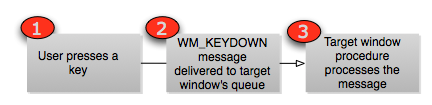
When a user presses a key, the system generates a WM_KEYDOWN message and delivers it to the target window’s queue. Typically the target window is the foreground window (i.e. the one the user is currently interacting with). When the message hits the queue, the owning thread wakes up and processes the message – which could mean appending it to a line being typed, taking some special action if the key is a “hot key” or even just ignoring it. The diagram below shows a very simplified diagram of a non-hooked messaging system:
- an address to a hook procedure that will handle the message before the target window. This procedure is a function of type HOOKPROC that receives the message, processes it, and optionally passes it to the next hook in the chain (or the target window if there are no other hooks) with CallNextHookEx.
- a handle to the DLL that contains the hook procedure. This DLL is loaded into the address space of the thread that owns the target window.
- a thread ID (i.e. scope) for the hook. This can be a specific thread or 0 to affect all threads in the current desktop.

Data Structures
hooks is tagHOOK. The one below is from a
Windows 7 x64 system.
- head is the common header for USER objects and can help identify the owning process or thread. More information on these headers will be published in a future MoVP post.
- phkNext is a pointer to the next hook in the chain. When a hook procedure calls CallNextHookEx, the system locates the next hook using this member.
- offPfn is an RVA (relative virtual address) to the hook procedure. The procedure can be in the same module as the code calling SetWindowsHookEx (for local, thread-specific hooks only) in which case ihmod will be -1. Otherwise, for global hooks, the procedure is in a DLL and ihmod is an index into win32k!_aatomSysLoaded (an array of atoms). To determine the name of the DLL, you must translate the ihmod into an atom and then obtain the atom name.
- ptiHooked can be used to identify the hooked thread.
- rpdesk can be used to identify the desktop in which the hook is set. Hooks cannot cross desktop boundaries.
The MessageHooks Plugin
The messagehooks plugin enumerates global hooks by finding all desktops and analyzing tagDESKTOP.pDeskInfo.aphkStart – an array of tagHOOK structures whose positions in the array indicate which type of message is to be filtered (such as WH_KEYBOARD or WH_MOUSE). The tagDESKTOP.pDeskInfo.fsHooks value can be used as a bitmap to tell you which positions in the array are actively being used. Likewise, for each thread attached to a desktop, the plugin scans for thread-specific hooks by looking at tagTHREADINFO.aphkStart and tagTHREADINFO.fsHooks.
As you can see, all of the hooks are global, because the flags include HF_GLOBAL. That means they’re the direct result of calling SetWindowsHookEx with the dwThreadId parameter set to 0. Although all global hooks are not malicious, out of the malware samples I’ve seen that hook window messages, they typically do use global hooks.
The difference between the three hooks shown is that the first one is global and was gathered from the tagDESKTOP structure. You can tell because the target thread is “<any>”. This is essentially just telling you that any GUI threads that run in the WinSta0Default desktop will be subject to monitoring by the malware. The next two are associated with specific threads (as a result of the global hook) and have caused Dll.dll to be injected into explorer.exe and VMwareUser.exe.
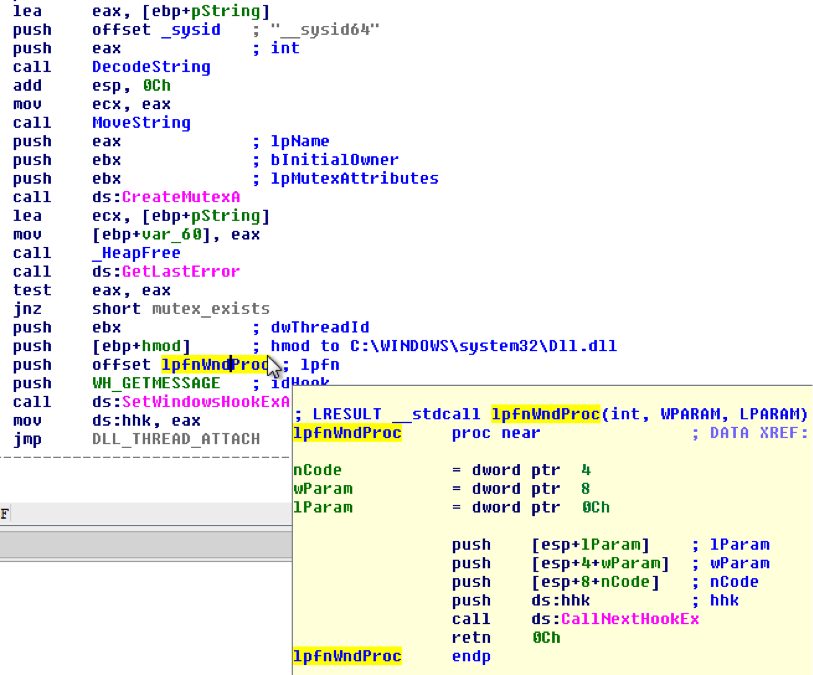
We already know from the disassembly that the lpfnWndProc is empty – this hook just exists to inject a DLL into other processes. However, don’t overlook the fact that the messagehooks plugin shows you the address (as an RVA) of the hook procedure in the DLL. In the examples shown the hook procedure can be found at 0x1fd9 from the base of Dll.dll in the affected processes. Thus if you didn’t preemptively know the purpose of a hook, you can easily use volshell and switch into the target process’ contexts and disassemble the function.
Below, we first locate the base address (0xac0000) of the injected DLL inside explorer.exe. Next we disassemble the code at offset 0x1fd9:
$ python vol.py -f laqma.vmem dlllist -p 1624 | grep Dll.dll
Volatile Systems Volatility Framework 2.2_alpha
0x00ac0000 0x8000 C:Documents and SettingsMal WareDesktopDll.dll
$ python vol.py -f laqma.vmem volshell
Volatile Systems Volatility Framework 2.2_alpha
Current context: process System, pid=4, ppid=0 DTB=0x31a000
Welcome to volshell! Current memory image is:
file:///Users/Michael/Desktop/laqma.vmem
To get help, type ‘hh()’
>>> cc(pid = 1624)
Current context: process explorer.exe, pid=1624, ppid=1592 DTB=0x80001c0
>>> dis(0x00ac0000 + 0x00001fd9)
0xac1fd9 ff74240c PUSH DWORD [ESP+0xc]
0xac1fdd ff74240c PUSH DWORD [ESP+0xc]
0xac1fe1 ff74240c PUSH DWORD [ESP+0xc]
0xac1fe5 ff350060ac00 PUSH DWORD [0xac6000]
0xac1feb ff157c40ac00 CALL DWORD [0xac407c] ; CallNextHookEx
0xac1ff1 c20c00 RET 0xc
Event Hooks
Event hooks can be used by applications to receive notification when certain events occur. Similar to message hooks, the SetWinEventHook API function can also be used to generically load a DLL into any processes that fire events, such as explorer.exe. For example, Explorer uses events when sounds are played (EVENT_SYSTEM_SOUND), when a scroll operation begins (EVENT_SYSTEM_SCROLLSTART), or when an item in a menu bar such as the Start menu is selected (EVENT_SYSTEM_MENUSTART). If malware doesn’t care about the type of event (just that it can load a DLL into the remote process), it will use EVENT_MIN and EVENT_MAX, which apply to all events. This is a quick and effective way to execute code in the context of a remote process.
Data Structures
The data structure for event hooks is tagEVENTHOOK. Microsoft does not document this internal structure (even in the public Windows 7 PDBs), so its fields and offsets are reverse engineered from win32k.sys binaries.
>>> dt(“tagEVENTHOOK”)
‘tagEVENTHOOK’ (None bytes)
0x18 : phkNext [‘pointer’, [‘tagEVENTHOOK’]]
0x20 : eventMin [‘Enumeration’, {‘target’: ‘unsigned long’, ‘choices’: {1: ‘EVENT_MIN’, 2: ‘EVENT_SYSTEM_ALERT’, [snip]
0x24 : eventMax [‘Enumeration’, {‘target’: ‘unsigned long’, ‘choices’: {1: ‘EVENT_MIN’, 2: ‘EVENT_SYSTEM_ALERT’, [snip]
0x28 : dwFlags [‘unsigned long’]
0x2c : idProcess [‘unsigned long’]
0x30 : idThread [‘unsigned long’]
0x40 : offPfn [‘unsigned long long’]
0x48 : ihmod [‘long’]
- phkNext is the next hook in the chain
- eventMin is the lowest system event that the hook applies to
- eventMax is the highest system event that the hook applies to
- dwFlags tells you if the process generating the event will load the DLL containing the event hook procedure into its address space (WINEVENT_INCONTEXT). It also tells you if the thread installing the hook wishes to be except from the hook (WINEVENT_SKIPOWNPROCESS and WINEVENT_SKIPOWNTHREAD).
- idProcess is the pid of the target process, or 0 for all processes in the desktop
- idThread is the tid of the target thread, or 0 for all threads in the desktop
- offPfn is the RVA to the hook procedure in the DLL
- ihmod is the index into the win32k!_aatomSysLoaded array, which can be used to identify the full path to the DLL containing the hook procedure (see ihmod in the message hook section).
Conclusion
Message and Event hooks are similar to API hooks (such as trampoline, IAT, EAT hooks) in that they allow malware to redirect the normal flow of execution to attacker-designed functions. Yet they are also unique because they’re legitimate components of the GUI subsystem just being used in a malicious manner. They don’t rely on overwriting pointers or patching instructions in process or kernel memory, so typical API-hook detecting utilities won’t catch them. The low-level internals and data structures are completely undocumented, which explains why there aren’t many tools, much less forensic tools, that can analyze a system in the way that Volatility now can.
More information on the messagehooks and eventhooks plugin and its usages in forensic investigations will be presented at Open Memory Forensics Workshop (OMFW) 2012.